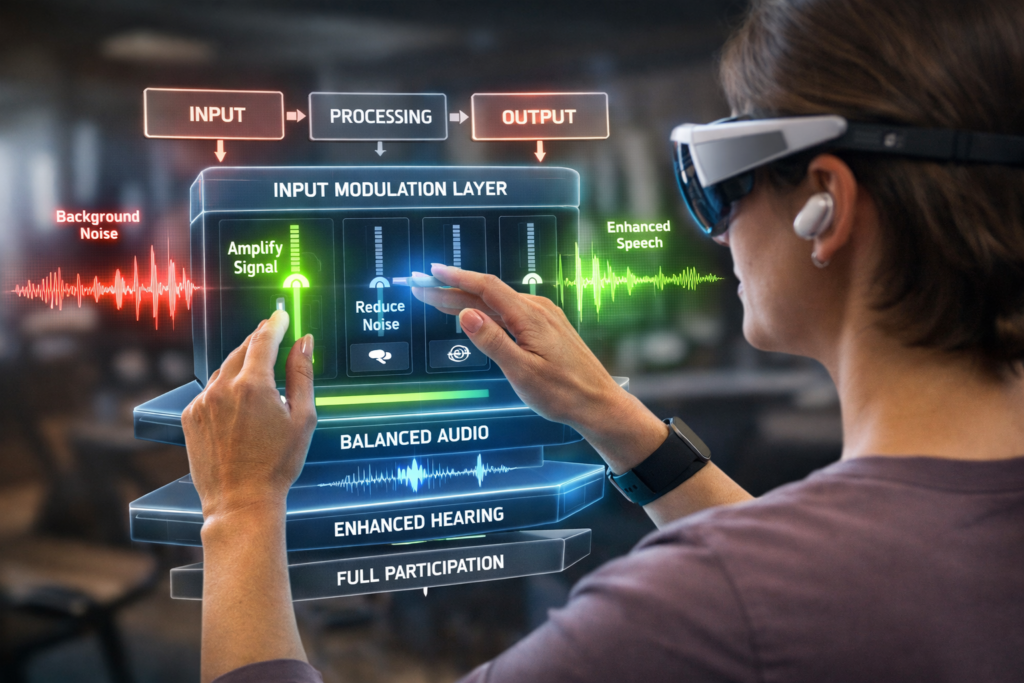
Technology accessibility begins when systems reshape human input, not just add features.
Most barriers aren’t physical.
They’re input mismatches.
For some people, the world isn’t just loud—it’s unregulated.
Sound stacks. Light spikes. Conversations overlap.
When input exceeds processing capacity, the system doesn’t adapt.
It shuts down.
Participation drops—not from lack of interest or ability,
but because the environment becomes incompatible.
⸻
System Breakdown
Human experience runs on a simple loop:
Input → Processing → Output
When input is:
- too high (overload), or
- too low (under-stimulation)
the system destabilizes.
This shows up as:
- withdrawal
- fatigue
- misinterpretation
- reduced participation
This isn’t a personal failure.
It’s a system mismatch between environment and nervous system.
⸻
Where Technology Changes the System
Most technology is designed for convenience.
The best technology does something else:
It modulates input to match the human system.
Examples:
- Noise canceling → reduces excess input
- Transparency modes → selectively restores relevant input
- Live translation → converts inaccessible input into usable form
- Signal amplification → increases weak or missed inputs
These aren’t features.
They are adaptive filters.
They shift the environment from:
- fixed → responsive
- overwhelming → regulated
- inaccessible → usable
⸻
System Effect
When input is regulated:
- overload → stability
- confusion → clarity
- exclusion → participation
The same person, same ability—
different outcome.
Because the system changed.
At a recent meetup, I followed a talk in a language I don’t speak—
through real-time translation on the same device.
The barrier wasn’t removed.
It was translated into compatibility.
⸻
Reframe
What looks like “just earbuds” is often:
- a sensory regulator
- a signal filter
- an accessibility layer
Technology doesn’t need to be complex to be transformative.
It just needs to align with the human system.
⸻
System Insight
Technology accessibility is not a feature—it’s a dynamic alignment layer between humans and environments.
It’s a dynamic alignment layer between humans and environments.
And it applies broadly:
- sensory sensitivity → reduce input
- attention variability → structure input
- hearing/vision limits → amplify input
- language barriers → convert input
Same principle. Different use cases.
⸻
Application
If you’re designing technology, ask:
→ What part of the human input loop is failing?
→ Am I reducing noise, amplifying signal, or translating meaning?
If the answer is yes—
you’re not building a product.
You’re building access.
⸻
Stay odd. Stay curious.
— Oddly Robbie
Leave a Reply